// architecture-reference
Companion to the Build Guide below. Three-zone VPS topology, component rationale with compatibility notes, and the conditions under which each choice would be revisited.
Download: architecture-reference-v2.docx
Read full document
Production-Grade Web Platform
Architecture Reference & Component Rationale
Companion document to the step-by-step Build Guide
Revision 2 — 2026-04-23 — see final section for change log
Scope
Secure, scalable, AI-friendly SaaS platform
Target: 100+ customers/day · Headroom to 10x without rework
Five VPS tier · Zero public IPs on internal services
Social login via Google · GitHub · Microsoft · Apple
Executive Summary
This document is the architecture reference for the platform described in the companion Build Guide. It exists to answer three questions:
- What does the system look like as a whole?
- Why was each component selected over the alternatives?
- What is compatible with what, and where are the known boundaries?
The architecture is built on five VPSes across three trust zones (public, DMZ, private network). Only one VPS has a public IP address. All other services communicate over a private network, with the application server acting as the only path to the data layer. Authentication is federated through a self-hosted Authentik identity provider, which brokers social login from Google, GitHub, Microsoft, and Apple so the application only ever integrates with one identity system.
Every major component was selected against at least one alternative. Those choices are documented in the rationale section with compatibility notes, switching costs, and conditions under which a different choice would be justified.
System Architecture Diagram
The diagram below shows the full system at a glance. Three trust zones (public, DMZ, private) are color-coded. Arrows show the direction of traffic flow and its classification (user traffic, internal service calls, OIDC federation, backup data).
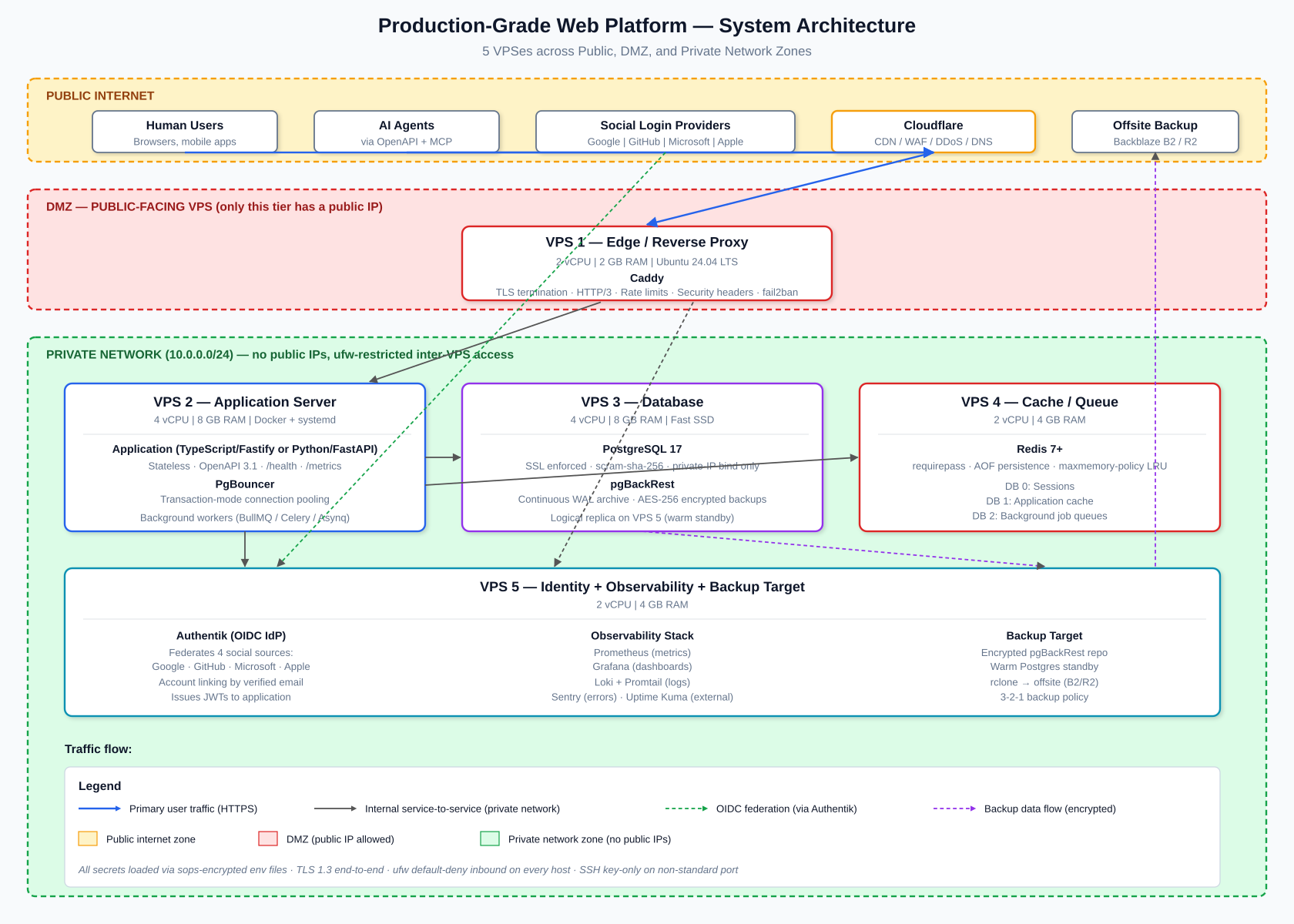
Figure 1 — Full system architecture. The Edge VPS (DMZ) is the only public-facing node. VPS 2-5 sit on a private 10.0.0.0/24 network with ufw default-deny inbound; each pair of services is allowed only on specific ports from specific peers.
Authentication Flow
The diagram below shows exactly what happens when a user clicks "Sign in with Google" (the flow is identical for GitHub, Microsoft, and Apple — only step 3's destination changes). The critical property: the application never speaks directly to upstream identity providers. Authentik brokers every provider, so the application has one integration and one token format to validate.
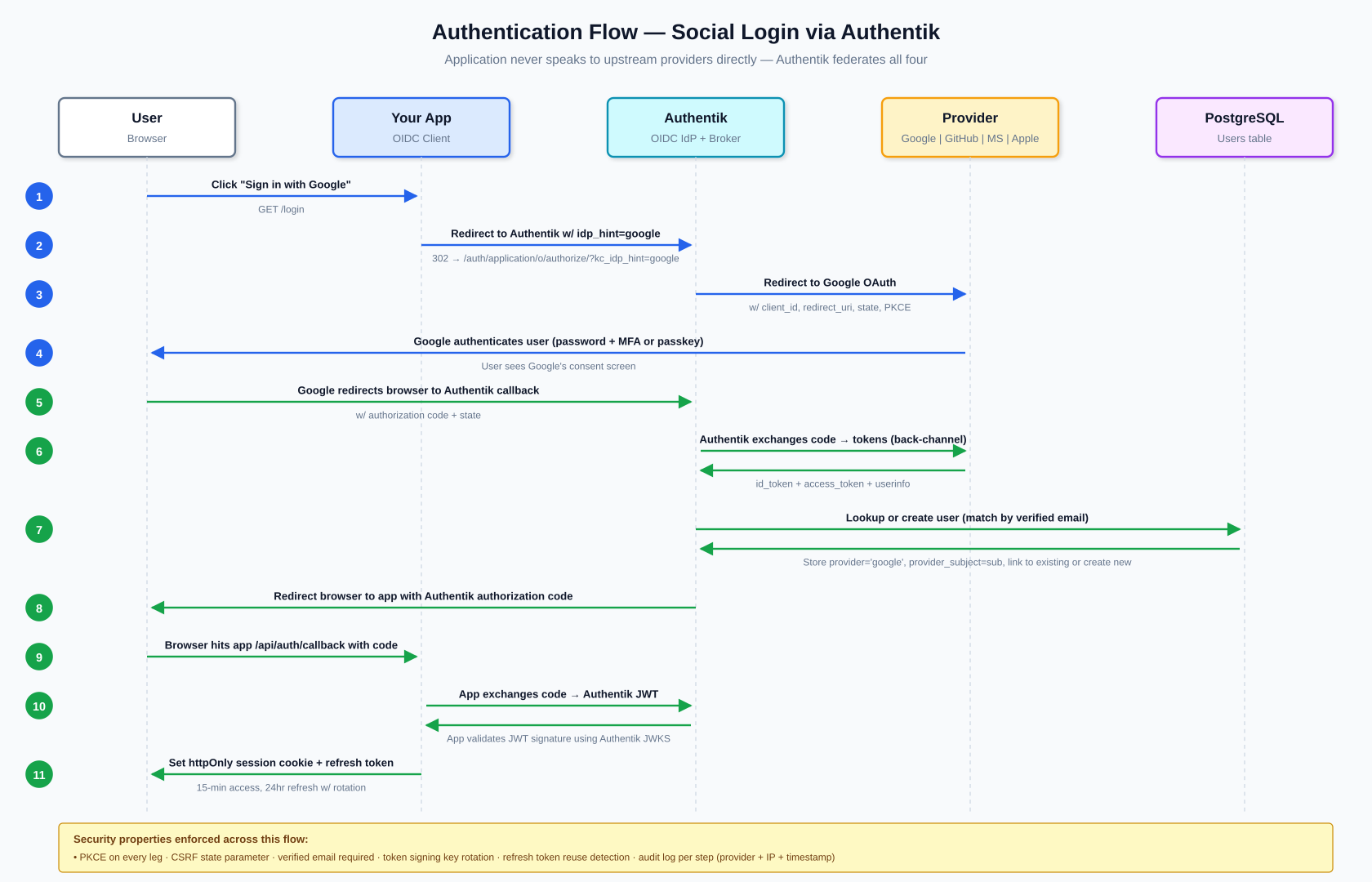
Figure 2 — Eleven-step social login flow with security properties called out. Blue arrows are forward-legs (user → provider), green arrows are return-legs (provider → app).
Component Rationale — Why Each Choice
For every layer, the table below lists the chosen component, the closest alternative, and the reason for the choice. Where multiple options are viable for different use cases, the use case conditions are given.
Layer | Chosen | Alternative | Why the chosen option |
|---|---|---|---|
OS | Ubuntu 24.04 LTS | Debian 12 (slower-moving, same family); RHEL/Rocky (enterprise cert support) | Largest package ecosystem, 5-year LTS support window, matches tooling defaults, one hardening playbook across every VPS. |
CDN / WAF | Cloudflare (free tier) | Fastly, AWS CloudFront, BunnyCDN | Free DDoS protection, global edge, managed WAF rules, DNS all in one. Competitors either cost money (Fastly, CloudFront) or lack the WAF (Bunny). |
Reverse proxy | Caddy | Nginx, Traefik, HAProxy | Auto-provisions Let's Encrypt TLS with zero config; readable Caddyfile; HTTP/3 built-in. Nginx is faster at extreme scale but has more footguns and manual cert management. |
Application runtime | TypeScript + Fastify (default) or Python + FastAPI | Go + Chi/Echo, Elixir + Phoenix, Ruby + Rails | Both produce automatic OpenAPI 3.1 specs (critical for AI consumption), strong typing, large ecosystems, excellent async I/O. Go is faster for CPU-heavy work; Elixir for very high concurrency; Rails for CRUD speed. Pick the one your team already knows. |
Database | PostgreSQL 18 | MySQL/MariaDB, CockroachDB, MongoDB | Single engine covers relational, JSON, full-text, geospatial, time-series (TimescaleDB), and vector (pgvector) needs. MySQL is fine but weaker on JSON/extensions. Cockroach adds ops complexity. Mongo loses relational guarantees. Postgres 18 released Sept 2025; v17 still valid if you have existing tooling bound to it. |
Connection pool | PgBouncer (transaction mode) | pgcat (Rust-based, sharding-aware), app-native pooling only | Battle-tested for 15+ years, extremely low overhead, standard in the Postgres world. pgcat is newer and promising for future sharding but not yet as proven. |
DB backups | pgBackRest | Barman, Wal-G, pg_dump + cron | Handles full, differential, and WAL archive together with strong encryption and parallelism. Barman is equivalent; choose either. pg_dump alone is not sufficient for production. |
Cache / queue | Valkey 8+ (or Redis 8+) | KeyDB, Dragonfly, Memcached, RabbitMQ | Handles sessions, cache, and job queues in one service. Valkey is a BSD-licensed Linux Foundation fork of Redis 7.2.4 (forked after Redis's 2024 license change); Redis 8 added AGPLv3 back. Both are drop-in compatible. Dragonfly is faster but younger. Memcached has no persistence or queues. RabbitMQ is overkill at this scale. |
Container runtime | Docker + systemd | Podman, Kubernetes, plain binaries | Docker is the path of least resistance for CI/CD registries and deploy tooling. Kubernetes brings massive operational overhead not justified below a few thousand concurrent users. Podman is a fine drop-in if rootless is required. |
Identity provider | Authentik (self-hosted) | Keycloak, Auth0, Clerk, FusionAuth | Modern Python stack, active development, clean UI, free at any scale. Keycloak is equivalent (Java, heavier). Auth0/Clerk are SaaS and get expensive fast past free tier. FusionAuth is solid but smaller community. |
Auth. method | OIDC (OAuth 2.0 + ID tokens) | SAML 2.0, Magic links, LDAP | OIDC is the modern standard for web/mobile/API and is what all four social providers speak. SAML is added later for enterprise B2B customers who require it. Magic links can complement, not replace, this. |
Social: Google | Sign in with Google | Apple Sign-In | Reaches 40-60% of consumer users with one click, textbook OIDC implementation, verified email skips email verification. |
Social: GitHub | Sign in with GitHub | GitLab OAuth | Signals 'developer-friendly', 180M+ users in the dev audience, enables useful secondary integrations (repo import, org membership gating). |
Social: Microsoft | Sign in with Microsoft (Entra ID) | Okta, Auth0 federation, direct SAML | Covers 100M+ corporate users via one button; handles both personal and work/school accounts. Standard B2B login. |
Social: Apple | Sign in with Apple | Facebook/Meta Login | Strongly recommended for iOS apps offering other social logins (App Store 4.8: Sign in with Apple OR an equivalent privacy-focused alternative, relaxed Jan 2024); privacy-conscious users prefer it; one-tap Face ID/Touch ID boosts conversion. |
Metrics | Prometheus + Grafana | Datadog, New Relic, InfluxDB | Industry standard, free, integrates with everything. Datadog is superior out of the box but is paid SaaS. InfluxDB is a timeseries DB without Prometheus's pull model and ecosystem. |
Logs | Loki + Promtail | Elasticsearch/ELK, Graylog, Splunk | Loki is 10x cheaper to run than Elasticsearch at this scale because it indexes only labels (not content). ELK is more powerful if full-text log search is required. Splunk is enterprise-priced. |
Error tracking | Sentry (self-hosted or free tier) | Rollbar, Bugsnag, Raygun | Open source, generous free tier, best Python/Node/Go integrations, release-tracking built in. Competitors are fine SaaS but add cost. |
Secrets | sops + age (file-based) | HashiCorp Vault, Infisical, Doppler | Secrets stay in git, encrypted. Vault is overkill for small teams but appropriate past ~20 engineers. Infisical is a nice middle ground with a UI. |
Offsite backup | Backblaze B2 or Cloudflare R2 | AWS S3, Azure Blob, GCS | B2 has free egress to Cloudflare. R2 has a generous free tier and cheap egress. S3 charges for egress. |
CI/CD | GitHub Actions | GitLab CI, Forgejo Actions, Drone, Jenkins | Free for public repos and generous for private; YAML is standard; massive marketplace. Forgejo Actions if fully self-hosted is required. Jenkins is legacy. |
Compatibility Matrix
What works with what, where the edges are, and which combinations require extra care. Color legend: green = compatible as-is, yellow = requires specific config, red = do not combine.
Integration | Compatibility | Notes |
|---|---|---|
Caddy + Cloudflare (proxied) | Compatible | Use Cloudflare 'Full (strict)' mode; restrict origin firewall to Cloudflare IP ranges; Caddy still provisions its own Let's Encrypt cert for the origin leg. |
PgBouncer (transaction mode) + Postgres prepared statements | Compatible* | *Requires PgBouncer 1.21+ for protocol-level prepared statements. Older versions break prepared statements in transaction mode — either use session pooling or upgrade. |
Authentik + all four social providers simultaneously | Compatible | All four upstream providers (Google, GitHub, Microsoft, Apple) can be configured as parallel Sources on one enrollment flow. Users see all four buttons on one login page. |
Account linking across providers by verified email | Compatible | All four providers return verified emails (Apple may return a private relay address but it's still verified). Authentik merges on match. |
Redis + session storage + BullMQ + cache on one instance | Compatible | Use separate Redis logical databases (DB 0, 1, 2). Set maxmemory-policy to allkeys-lru on cache DB only; use noeviction on queue and session DBs to avoid data loss. |
Docker --read-only + app with temp files | Compatible* | *Requires --tmpfs /tmp for anything needing temp space. Most web frameworks work; some image-processing libraries need additional tmpfs mounts. |
Prometheus + node_exporter on all VPSes | Compatible | Prometheus scrapes over the private network. No changes to ufw needed beyond allowing port 9100 from the monitoring VPS's private IP. |
Apple Sign-In + missing name capture on first login | Incompatible | Apple only returns the user's name on the very first authorization. Subsequent logins return only the stable user ID. Must persist the name immediately on first login or lose it forever. |
Microsoft client secret + 'set and forget' deploys | Incompatible | Microsoft client secrets expire after max 24 months. Use certificate-based authentication instead for production, or set a firm calendar reminder to rotate before expiration. |
GitHub OAuth + requiring state validation | Caution | GitHub's default OAuth flow does not enforce the state parameter server-side. Every OIDC library does this correctly, but a hand-rolled integration without explicit state checking is vulnerable to CSRF. Authentik handles this correctly. |
Redis AOF + maxmemory-policy allkeys-lru on queue DB | Incompatible | LRU eviction on a queue database loses jobs under memory pressure. Use noeviction policy on any Redis DB that holds queue data; only the cache DB should use allkeys-lru. |
PostgreSQL logical replication + DDL changes (CREATE/ALTER) | Caution | Logical replication does not replicate DDL. Schema migrations must be applied separately to both primary and replica in the correct order. Physical replication (streaming) has no such limit but replicates byte-for-byte. |
Cloudflare 'proxied' (orange cloud) + raw TCP services | Incompatible | Cloudflare's proxy only handles HTTP/HTTPS (and specific WebSocket upgrades). Raw TCP (like direct Postgres or SSH) must go through a separate DNS record with proxy disabled or through Cloudflare Tunnel. |
Let's Encrypt + wildcard cert via HTTP-01 challenge | Incompatible | Wildcards require DNS-01 challenge. Caddy supports this natively with a Cloudflare/Route53/etc. API token. HTTP-01 can issue only per-hostname certs. |
Cloudflare proxied + Caddy Let's Encrypt (HTTP-01) | Caution | When Cloudflare is proxying port 80, Let's Encrypt HTTP-01 challenges reach Cloudflare, not Caddy. Options: (1) enable Cloudflare 'Always Use HTTPS' AFTER first cert issuance, (2) use DNS-01 challenge instead, or (3) pause Cloudflare during initial cert provisioning only. |
fail2ban + Cloudflare (ban by source IP) | Incompatible* | *By default, Caddy sees Cloudflare's IP as the source. Configure Caddy's 'trusted_proxies' directive with Cloudflare IP ranges so X-Forwarded-For is trusted; then fail2ban bans the real client IP. Otherwise you ban Cloudflare itself. |
Kubernetes + this architecture | Compatible but not recommended | Everything described can run in Kubernetes, but the operational overhead (control plane, ingress controller, CSI drivers, RBAC, network policies) is not justified below a few thousand concurrent users. Revisit at 10x scale. |
Docker network=host + ufw inter-container isolation | Incompatible | Using --network host disables Docker's per-container firewalling; containers share the host's network namespace. Acceptable here because only one container runs on the app VPS, but do not combine with multiple untrusted containers. |
Storing provider access tokens in the app database | Not recommended | Access tokens for Google/GitHub/etc. stay in Authentik. The app requests them from Authentik via token exchange only when needed. Storing them in app DB duplicates sensitive data and rotates inconsistently. |
Social Login Providers — Side by Side
All four providers are configured as Sources inside Authentik. The application never speaks to them directly.
Provider | Protocol | Scopes for login | Reach / best for | Notable quirk |
|---|---|---|---|---|
OIDC | openid email profile | ~1.8B Gmail users Best for: B2C, prosumer SaaS | Exact redirect URI matching (no wildcards). App verification required if requesting sensitive scopes. | |
GitHub | OAuth 2.0 | read:user user:email | 180M+ developers Best for: devtools, APIs, AI/ML, infra SaaS | Not OIDC — no ID tokens. Make an extra /user call. user:email scope required to read hidden emails. |
Microsoft | OIDC | openid email profile offline_access | Hundreds of millions via Entra ID Best for: B2B SaaS, enterprise | Client secrets expire (max 24 months). Corporate tenants may require admin consent for any Graph scope. |
Apple | OIDC | name email | Apple user base Best for: iOS apps (strongly encouraged, App Store 4.8), privacy-focused | Client secret is a signed JWT, regenerated every 6 months. Name returned only on first login. Private email relay adds forwarding configuration. |
Alternatives (if any of the four is dropped)
- Google dropped → Apple Sign-In (required OR privacy-focused alternative for iOS apps with other social login; provides private email relay).
- GitHub dropped → GitLab OAuth (self-hosted support; smaller reach; complement rather than replace).
- Microsoft dropped → Okta/Auth0 federation or direct SAML for enterprise customers specifically requiring their existing IdP.
- Apple dropped → Facebook/Meta Login (large reach in non-Western regions; weaker DX and trust in Western markets).
Scaling Paths
The architecture is designed so that scaling past 100/day to 10,000/day requires additions, not rewrites. Specific first moves for common bottlenecks:
When you hit | First scaling move |
|---|---|
~1,000 requests/second at app tier | Add a second App VPS, load-balance behind Caddy |
Database query times climbing | Add Postgres read replica on a new VPS for analytics/reporting workloads |
Postgres write saturation | Vertical scale primary; if that runs out, introduce Citus or pgpool for partitioning |
Redis approaching 3GB used | Vertical scale; or split queue and cache to separate instances |
Background jobs overwhelming app | Move workers to dedicated Worker VPS(es) |
Multi-region latency | Deploy read replicas per region; use Cloudflare Argo for smart routing |
Team size exceeds ~20 engineers | Introduce HashiCorp Vault for secrets, replace sops + age |
Enterprise customers demand SSO | Configure SAML 2.0 provider in Authentik; per-customer SAML configurations |
AI-Friendly Design Properties
The platform is designed so an AI agent can consume it as easily as a human. The specific design decisions that enable this:
API contract
- OpenAPI 3.1 spec exposed at /openapi.json; human-rendered at /docs via Swagger UI or Scalar.
- All resources follow the pattern /api/v1/<resource>/{id}/<sub-resource>/{id} — no endpoint surprises.
- Every error response follows RFC 9457 (Problem Details). Each error has type, title, detail, status, and a machine-readable error code.
- Every mutating endpoint (POST, PUT, PATCH, DELETE) accepts an Idempotency-Key header so agents can safely retry without risking duplicate side effects.
Agent identity & safety
- Agents get scoped API tokens with explicit permission lists, not user-level credentials.
- All agent actions are audit-logged with the agent's identifier, token ID, IP, and timestamp — indistinguishable in format from human actions.
- Read-only endpoints clearly separated from write endpoints; agents can be restricted to read-only via token scope.
MCP (Model Context Protocol) server
- A read-only MCP server runs on the Identity VPS, exposing pre-defined safe queries against the database and API endpoints.
- Lets AI assistants answer questions about system state (user counts, recent errors, queue depth) without granting them write access.
- MCP tool descriptions are explicit about what each tool does, what it returns, and what it cannot do.
Observability surface
- Prometheus metrics endpoint is queryable by both humans (Grafana) and agents (direct PromQL).
- Loki logs are structured JSON; every event has consistent field names (trace_id, user_id, action, result).
- Request IDs (X-Request-ID) propagate end-to-end so an agent investigating an issue can correlate app logs, DB slow queries, and metrics for the same request.
Recommended Build Sequence
Build in this exact order. Each step delivers a verifiable state before starting the next.
- Day 1-2 — Provision 5 VPSes, run Ansible hardening playbook, verify private networking, confirm nothing is exposed beyond the Edge VPS.
- Day 3 — Install PostgreSQL on DB VPS with SSL, scram-sha-256, private-IP bind only. Verify remote connections fail from everywhere except the App VPS.
- Day 3 — Install Valkey (or Redis 8+) on Cache VPS with requirepass, command renaming, private-IP bind only.
- Day 4 — Install Caddy on Edge VPS, configure Cloudflare proxied DNS, deploy a hello-world app on the App VPS, verify end-to-end TLS and HTTP/3 work.
- Day 5 — Deploy Authentik on Identity VPS. Configure an OIDC provider for your app, verify login flow with a throwaway client.
- Day 6 — Add Google social login source in Authentik. Test end-to-end sign-up flow.
- Day 7 — Add GitHub, Microsoft, Apple sources. Test account linking (same email across providers).
- Week 2+ — Begin building the application itself, now onto a production-shaped foundation.
- Before first real user — Add monitoring (Prometheus, Grafana, Loki), set up Sentry, configure pgBackRest to offsite, test a full restore.
- When manual deploys become annoying — Add CI/CD (GitHub Actions), zero-downtime deploy strategy.
Revision Notes
This reference is maintained with explicit revision tracking. When claims are validated against current sources and found to need updating, the changes are logged here rather than silently overwritten.
Revision 2 (2026-04-23)
Changes applied after post-draft web research against current 2026 sources:
- PostgreSQL 17 → 18. Postgres 18 was released September 2025 (18.3 in Feb 2026). Version 17 remains supported through Nov 2029 and is valid for existing tooling, but new deployments should start on 18.
- Cache engine — Redis-only → Valkey-or-Redis. Redis Ltd. changed the Redis license in March 2024 (BSD → dual RSALv2/SSPL). Linux Foundation responded with Valkey, a BSD-licensed fork backed by AWS, Google, Oracle, Ericsson, Snowflake. Redis 8 (May 2025) added AGPLv3 back. Both work here; Valkey is the safer default for new deployments.
- Apple Sign-In — "mandatory" → "strongly recommended." App Store guideline 4.8 was relaxed in January 2024: developers may now offer Sign in with Apple OR an equivalent privacy-focused alternative. Apple Sign-In remains the simplest compliance path and still has real UX advantages (hide-my-email, one-tap Face ID).
- GitHub user count — ~100M → 180M+. Updated to current 2026 figure. Strategic positioning (GitHub >> GitLab on reach) is unchanged.
- Hetzner Edge VPS spec — 2 vCPU/2GB → 2 vCPU/4GB. Hetzner's smallest shared-vCPU SKU (CX22) is 2 vCPU/4GB; there is no 2GB plan. Specs updated to match actual available SKUs.
Claims validated and kept unchanged
The following were explicitly verified against current sources and confirmed:
- Microsoft Entra ID client secret lifetime: 24 months max, ≤12 months recommended, certificates preferred in production
- Apple Sign-In client secret JWT: 180 day (6 month) maximum
- PgBouncer 1.21+ supports prepared statements in transaction mode via max_prepared_statements
- Ubuntu 24.04 LTS: standard support through April 2029
- Authentik as default self-hosted identity provider recommendation
- Caddy automatic HTTPS and HTTP/3 features
- RFC 9457 Problem Details as the current HTTP API error standard
What was not re-validated
Sizing judgments ("100+ customers/day fits on this hardware"), architectural opinions ("Kubernetes not worth it below a few thousand concurrent users"), and detailed region-specific pricing beyond main pricing pages are engineering judgment calls. They should be revisited as your specific workload and region become concrete.
// generic-build-guide
Step-by-step blueprint for a secure, scalable, AI-friendly platform on five VPSes — from provisioning through backup and DR. Designed for 100+ daily customers with 10x headroom.
Download: generic-build-guide.md
Read full document
Production-Grade Web Platform Build Guide
A complete, step-by-step blueprint for building a secure, scalable, AI-friendly platform on VPS infrastructure. Designed for 100+ daily customers with headroom to scale 10x without architectural rework.
Revision 2 (2026-04-23). This revision applies corrections from post-draft web research. See Appendix B — Revision Notes for a summary of what changed and why.
Table of Contents
- Architectural Philosophy
- Infrastructure Layout
- Phase 1 — Provision and Harden VPSes
- Phase 2 — Network Edge
- Phase 3 — Database Server
- Phase 4 — Cache and Queue Server
- Phase 5 — Application Server
- Phase 6 — Identity Provider (Authentik)
- Phase 7 — Social Login Providers
- Phase 8 — Observability
- Phase 9 — CI/CD and Deployment
- Phase 10 — Backup and Disaster Recovery
- AI-Friendly Design Choices
- Recommended Starting Sequence
- What Not to Worry About Yet
1. Architectural Philosophy
Four principles drive every decision in this guide:
Separation of concerns across VPS boundaries. A single VPS running web + database + cache is a single blast radius. Splitting services means a compromised web server does not mean a compromised database.
Stateless application servers. Application servers become cattle, not pets. Everything stateful lives in dedicated services (Postgres, Redis, S3-compatible storage).
Defense in depth. Every layer assumes the layer in front of it has been compromised.
AI-friendly means API-first. Every capability exposed through a documented, versioned REST or GraphQL API with OpenAPI specs. Humans get a UI that consumes the same API an AI agent would.
2. Infrastructure Layout
| VPS | Role | Specs | Public IP? | Notes |
|---|---|---|---|---|
| VPS 1 | Edge / Reverse Proxy | 2 vCPU, 4GB RAM | Yes | Caddy, TLS, WAF, rate limiting (matches Hetzner CX22 and the DigitalOcean entry tier) |
| VPS 2 | Application Server | 4 vCPU, 8GB RAM | No (private only) | Runs the app in Docker |
| VPS 3 | Database | 4 vCPU, 8GB RAM, fast SSD | No (private only) | PostgreSQL + PgBouncer |
| VPS 4 | Cache / Queue | 2 vCPU, 4GB RAM | No (private only) | Valkey (or Redis) |
| VPS 5 | Identity / Monitoring | 2 vCPU, 4GB RAM | No (private only, proxied through Edge) | Authentik + Prometheus + Grafana + Loki |
Provider recommendation: Hetzner, OVH, or DigitalOcean. All offer free private networking between VPSes in the same region.
Non-negotiable: VPSes 2-5 have NO public IP. They communicate only over the private network. The Edge VPS is the only public entry point.
3. Phase 1 — Provision and Harden VPSes
3.1 Choose Operating System
Use Ubuntu 24.04 LTS on every VPS. Same OS everywhere = one hardening playbook, one patch cadence.
3.2 Initial Provisioning Steps
Run these steps on every VPS immediately after creation:
# 1. Update everything
apt update && apt upgrade -y
# 2. Create a deploy user with sudo
adduser --disabled-password --gecos "" deploy
usermod -aG sudo deploy
mkdir -p /home/deploy/.ssh
cp ~/.ssh/authorized_keys /home/deploy/.ssh/
chown -R deploy:deploy /home/deploy/.ssh
chmod 700 /home/deploy/.ssh
chmod 600 /home/deploy/.ssh/authorized_keys
echo "deploy ALL=(ALL) NOPASSWD:ALL" > /etc/sudoers.d/deploy
# 3. Harden SSH
sed -i 's/^#\?PermitRootLogin.*/PermitRootLogin no/' /etc/ssh/sshd_config
sed -i 's/^#\?PasswordAuthentication.*/PasswordAuthentication no/' /etc/ssh/sshd_config
sed -i 's/^#\?PubkeyAuthentication.*/PubkeyAuthentication yes/' /etc/ssh/sshd_config
sed -i 's/^#\?Port 22/Port 2222/' /etc/ssh/sshd_config # non-standard port cuts log noise
systemctl restart ssh
# 4. Install essentials
apt install -y ufw fail2ban unattended-upgrades chrony auditd apparmor-utils \
rsync curl wget jq htop iotop net-tools dnsutils
# 5. Enable automatic security updates
dpkg-reconfigure -plow unattended-upgrades
3.3 Firewall Rules per VPS
Edge VPS (VPS 1):
ufw default deny incoming
ufw default allow outgoing
ufw allow 2222/tcp # SSH (non-standard port)
ufw allow 80/tcp # HTTP (for Let's Encrypt challenges + redirects to HTTPS)
ufw allow 443/tcp # HTTPS
ufw allow 443/udp # HTTP/3 (QUIC)
ufw enable
All Internal VPSes (VPS 2-5): Allow only specific ports from specific private IPs.
Example for the Database VPS (VPS 3), allowing only the App VPS (VPS 2) to connect:
ufw default deny incoming
ufw default allow outgoing
ufw allow from 10.0.0.2 to any port 2222 proto tcp # SSH from management
ufw allow from 10.0.0.20 to any port 5432 proto tcp # Postgres from App VPS only
ufw enable
3.4 fail2ban Configuration
Create /etc/fail2ban/jail.local:
[DEFAULT]
bantime = 1h
findtime = 10m
maxretry = 5
backend = systemd
[sshd]
enabled = true
port = 2222
[caddy-auth]
enabled = true
filter = caddy-auth
logpath = /var/log/caddy/access.log
3.5 Kernel and sysctl Hardening
Create /etc/sysctl.d/99-hardening.conf:
# Disable IP forwarding unless needed
net.ipv4.ip_forward = 0
# SYN flood protection
net.ipv4.tcp_syncookies = 1
net.ipv4.tcp_max_syn_backlog = 2048
net.ipv4.tcp_synack_retries = 2
# Disable source routing
net.ipv4.conf.all.accept_source_route = 0
net.ipv6.conf.all.accept_source_route = 0
# Enable reverse path filtering
net.ipv4.conf.all.rp_filter = 1
net.ipv4.conf.default.rp_filter = 1
# Log martians
net.ipv4.conf.all.log_martians = 1
# Disable ICMP redirects
net.ipv4.conf.all.accept_redirects = 0
net.ipv6.conf.all.accept_redirects = 0
net.ipv4.conf.all.send_redirects = 0
# Disable IPv6 if not used
# net.ipv6.conf.all.disable_ipv6 = 1
# Kernel hardening
kernel.kptr_restrict = 2
kernel.dmesg_restrict = 1
kernel.unprivileged_bpf_disabled = 1
Apply: sysctl -p /etc/sysctl.d/99-hardening.conf
3.6 Automate Everything with Ansible
Put all of the above into an Ansible playbook stored in a private git repo. Rebuilding any VPS from scratch should be one command. Recommended structure:
ansible/
├── inventories/
│ └── production/hosts.yml
├── group_vars/
│ └── all.yml
├── roles/
│ ├── common/ # Hardening steps 3.2-3.5
│ ├── edge/ # Caddy + WAF
│ ├── app/ # Docker + app deploy
│ ├── database/ # Postgres + PgBouncer + backups
│ ├── cache/ # Redis
│ └── identity/ # Authentik + monitoring
└── site.yml
4. Phase 2 — Network Edge
4.1 Cloudflare (Free Tier)
Why: DDoS protection, global CDN, bot detection, WAF managed rules — all free. Eliminates ~90% of drive-by attacks before they reach your origin.
Setup steps:
1. Create Cloudflare account, add your domain
2. Change your domain's nameservers to Cloudflare's
3. Set DNS records for example.com and www.example.com to point to your Edge VPS, with "Proxied" (orange cloud) enabled
4. In Cloudflare → SSL/TLS → Overview, set mode to Full (strict)
5. In SSL/TLS → Edge Certificates, enable: Always Use HTTPS, HSTS, Minimum TLS Version 1.2, TLS 1.3, Automatic HTTPS Rewrites
6. In Security → WAF → Managed Rules, enable all Cloudflare-provided rulesets
7. In Network, enable HTTP/3 (QUIC)
Lock your origin to Cloudflare only. On the Edge VPS, replace the broad port 443 allow with Cloudflare's IP ranges: https://www.cloudflare.com/ips/
4.2 Install Caddy on Edge VPS
Why Caddy over Nginx: Auto-provisions and renews TLS via Let's Encrypt, sane defaults, readable config, HTTP/3 built in. Nginx is faster at extreme scale but has more footguns.
sudo apt install -y debian-keyring debian-archive-keyring apt-transport-https
curl -1sLf 'https://dl.cloudsmith.io/public/caddy/stable/gpg.key' | sudo gpg --dearmor -o /usr/share/keyrings/caddy-stable-archive-keyring.gpg
curl -1sLf 'https://dl.cloudsmith.io/public/caddy/stable/debian.deb.txt' | sudo tee /etc/apt/sources.list.d/caddy-stable.list
sudo apt update
sudo apt install -y caddy
4.3 Caddyfile Configuration
Edit /etc/caddy/Caddyfile:
{
email admin@example.com
servers {
protocols h1 h2 h3
}
}
(security_headers) {
header {
Strict-Transport-Security "max-age=31536000; includeSubDomains; preload"
X-Content-Type-Options "nosniff"
X-Frame-Options "DENY"
Referrer-Policy "strict-origin-when-cross-origin"
Permissions-Policy "geolocation=(), microphone=(), camera=()"
Content-Security-Policy "default-src 'self'; script-src 'self' 'unsafe-inline'; style-src 'self' 'unsafe-inline'; img-src 'self' data: https:; connect-src 'self'"
-Server
}
}
(rate_limit_auth) {
rate_limit {
zone auth_zone {
key {client_ip}
events 5
window 1m
}
}
}
example.com, www.example.com {
import security_headers
encode zstd gzip
# Redirect www to apex
@www host www.example.com
redir @www https://example.com{uri} permanent
# Auth endpoints - stricter limits
handle /api/auth/* {
import rate_limit_auth
reverse_proxy 10.0.0.20:3000
}
# Identity provider (Authentik) - proxied from the monitoring VPS
handle /auth/* {
reverse_proxy 10.0.0.50:9000
}
# Main app
handle {
reverse_proxy 10.0.0.20:3000 {
header_up X-Real-IP {remote_host}
health_uri /health
health_interval 10s
}
}
log {
output file /var/log/caddy/access.log {
roll_size 100mb
roll_keep 10
}
format json
}
}
Start: systemctl enable --now caddy
5. Phase 3 — Database Server
5.1 Install PostgreSQL 18
On VPS 3:
sudo apt install -y curl ca-certificates
sudo install -d /usr/share/postgresql-common/pgdg
sudo curl -o /usr/share/postgresql-common/pgdg/apt.postgresql.org.asc --fail https://www.postgresql.org/media/keys/ACCC4CF8.asc
sudo sh -c 'echo "deb [signed-by=/usr/share/postgresql-common/pgdg/apt.postgresql.org.asc] https://apt.postgresql.org/pub/repos/apt $(lsb_release -cs)-pgdg main" > /etc/apt/sources.list.d/pgdg.list'
sudo apt update
sudo apt install -y postgresql-18 postgresql-contrib-18 pgbouncer
Version note: PostgreSQL 18 was released in September 2025 and is the current latest stable major version (18.3 as of Feb 2026). Version 17 remains fully supported through November 2029 and is a valid choice if you have existing tooling bound to it. For a new deployment, start on 18.
5.2 Secure Postgres
Edit /etc/postgresql/18/main/postgresql.conf:
listen_addresses = '10.0.0.30' # Private IP only, NEVER '*'
port = 5432
max_connections = 100
# Memory (for 8GB RAM server)
shared_buffers = 2GB
effective_cache_size = 6GB
work_mem = 20MB
maintenance_work_mem = 512MB
# WAL / checkpoint
wal_level = replica
max_wal_size = 2GB
min_wal_size = 512MB
archive_mode = on
archive_command = 'test ! -f /var/lib/postgresql/archive/%f && cp %p /var/lib/postgresql/archive/%f'
# SSL
ssl = on
ssl_cert_file = '/etc/postgresql/18/main/server.crt'
ssl_key_file = '/etc/postgresql/18/main/server.key'
# Logging
log_destination = 'stderr'
logging_collector = on
log_directory = 'log'
log_connections = on
log_disconnections = on
log_checkpoints = on
log_lock_waits = on
log_min_duration_statement = 1000 # log queries over 1 second
Edit /etc/postgresql/18/main/pg_hba.conf — restrict to App VPS only:
# TYPE DATABASE USER ADDRESS METHOD
local all postgres peer
hostssl all app_user 10.0.0.20/32 scram-sha-256
hostssl all app_user 10.0.0.21/32 scram-sha-256 # PgBouncer on App VPS
5.3 Create Database and User
CREATE DATABASE myapp;
CREATE USER app_user WITH ENCRYPTED PASSWORD 'USE_A_LONG_RANDOM_VALUE';
GRANT CONNECT ON DATABASE myapp TO app_user;
\c myapp
GRANT USAGE ON SCHEMA public TO app_user;
GRANT SELECT, INSERT, UPDATE, DELETE ON ALL TABLES IN SCHEMA public TO app_user;
ALTER DEFAULT PRIVILEGES IN SCHEMA public GRANT SELECT, INSERT, UPDATE, DELETE ON TABLES TO app_user;
-- Critically: do NOT grant DDL rights to app_user. Schema changes go through migrations with a separate migration user.
5.4 Install PgBouncer (Connection Pooling)
On the App VPS (not the database VPS — put the pooler next to the app):
sudo apt install -y pgbouncer
Edit /etc/pgbouncer/pgbouncer.ini:
[databases]
myapp = host=10.0.0.30 port=5432 dbname=myapp
[pgbouncer]
listen_addr = 127.0.0.1
listen_port = 6432
auth_type = scram-sha-256
auth_file = /etc/pgbouncer/userlist.txt
pool_mode = transaction
max_client_conn = 500
default_pool_size = 20
server_tls_sslmode = require
5.5 Backups with pgBackRest
Install pgBackRest on the DB VPS and configure to push encrypted backups to VPS 5 and to offsite (Backblaze B2 or Cloudflare R2).
sudo apt install -y pgbackrest
/etc/pgbackrest/pgbackrest.conf:
[global]
repo1-path=/var/lib/pgbackrest
repo1-retention-full=4
repo1-cipher-type=aes-256-cbc
repo1-cipher-pass=GENERATE_A_LONG_RANDOM_VALUE
start-fast=y
[myapp]
pg1-path=/var/lib/postgresql/18/main
pg1-port=5432
Cron jobs:
# Weekly full backup, Sunday 2 AM
0 2 * * 0 postgres pgbackrest --stanza=myapp --type=full backup
# Daily diff backup, other days 2 AM
0 2 * * 1-6 postgres pgbackrest --stanza=myapp --type=diff backup
Test restores quarterly. A backup you have not restored from is Schrödinger's backup.
6. Phase 4 — Cache and Queue Server
6.1 Install Valkey (or Redis)
On VPS 4:
Recommended: Valkey 8+ (BSD-licensed, Linux Foundation-governed, drop-in compatible with Redis).
# Via official Valkey apt repo
sudo apt install -y valkey-server valkey-tools
Alternative: Redis 8+ (still usable for self-hosting; license situation explained below).
sudo apt install -y redis-server
License / fork note — important context. In March 2024, Redis Ltd. moved Redis from the BSD license to a dual RSALv2/SSPL license. In response, the Linux Foundation launched Valkey as a BSD-licensed fork starting from Redis 7.2.4, backed by AWS, Google, Oracle, Ericsson, and Snowflake. In May 2025, Redis 8 re-added AGPLv3 as a third licensing option, which makes Redis 8+ usable for self-hosting again under a genuinely open-source license.
Both Valkey and Redis 8+ work for this architecture. They are protocol-compatible, so your application code does not change. Choose Valkey if you want vendor-neutral governance and the BSD license (the safer default for most new projects in 2026). Choose Redis if you need specific Redis modules (RedisSearch, RedisJSON, RedisTimeSeries) that are licensed separately from Valkey's equivalents.
This guide uses
redis.confas the config filename in examples because both Valkey and Redis read the same format. On Valkey the file is typically at/etc/valkey/valkey.confinstead of/etc/redis/redis.conf— adjust paths accordingly.
6.2 Harden the cache server
Edit /etc/redis/redis.conf (or /etc/valkey/valkey.conf on Valkey):
bind 10.0.0.40 127.0.0.1 -::1 # private interface only
protected-mode yes
port 6379
requirepass USE_A_LONG_RANDOM_VALUE
# Disable dangerous commands
rename-command FLUSHALL ""
rename-command FLUSHDB ""
rename-command CONFIG ""
rename-command DEBUG ""
rename-command SHUTDOWN "shutdown_a8f2k" # renamed, not disabled
# Persistence
appendonly yes
appendfsync everysec
save 900 1
save 300 10
save 60 10000
# Memory policy
maxmemory 3gb
maxmemory-policy allkeys-lru
6.3 Logical Database Separation
Use logical databases to separate concerns (supported by both Redis and Valkey): - DB 0 — Sessions - DB 1 — Application cache - DB 2 — Job queues (BullMQ / Celery / Asynq)
6.4 Background Jobs
Choose based on app language: - TypeScript/Node → BullMQ - Python → Celery or ARQ - Go → Asynq
Use the background job system for: email sending, webhook deliveries, image processing, scheduled reports, anything that should not block an HTTP request.
7. Phase 5 — Application Server
7.1 Language Choice
Pick what you or your team know well. Strong candidates that produce maintainable, well-typed APIs with automatic OpenAPI specs:
- TypeScript + Fastify + Drizzle ORM (recommended default)
- Python + FastAPI + SQLAlchemy (equally good alternative)
- Go + Chi/Echo + sqlc
- Elixir + Phoenix
All produce automatic OpenAPI specs, which is essential for AI consumption.
7.2 Install Docker
On VPS 2:
sudo apt install -y apt-transport-https ca-certificates curl software-properties-common
curl -fsSL https://download.docker.com/linux/ubuntu/gpg | sudo gpg --dearmor -o /usr/share/keyrings/docker-archive-keyring.gpg
echo "deb [arch=$(dpkg --print-architecture) signed-by=/usr/share/keyrings/docker-archive-keyring.gpg] https://download.docker.com/linux/ubuntu $(lsb_release -cs) stable" | sudo tee /etc/apt/sources.list.d/docker.list
sudo apt update && sudo apt install -y docker-ce docker-ce-cli containerd.io docker-buildx-plugin docker-compose-plugin
sudo usermod -aG docker deploy
7.3 Run Application with Hardened systemd Unit
Even inside Docker, wrap the container launch in a systemd unit for uniform management:
/etc/systemd/system/myapp.service:
[Unit]
Description=MyApp
Requires=docker.service
After=docker.service
[Service]
Type=simple
User=deploy
Group=deploy
Restart=always
RestartSec=5
EnvironmentFile=/etc/myapp/env
ExecStartPre=-/usr/bin/docker stop myapp
ExecStartPre=-/usr/bin/docker rm myapp
ExecStart=/usr/bin/docker run --rm --name myapp \
--network host \
--env-file /etc/myapp/env \
--memory 4g --cpus 3 \
--read-only --tmpfs /tmp \
--security-opt no-new-privileges \
ghcr.io/myorg/myapp:latest
ExecStop=/usr/bin/docker stop myapp
# Host-level hardening (for the deploy user)
NoNewPrivileges=true
ProtectSystem=strict
ProtectHome=true
PrivateTmp=true
[Install]
WantedBy=multi-user.target
7.4 Secrets Management
Never commit secrets. Options, in order of preference: - sops + age — encrypted secrets in git, easy for small teams - Infisical (self-hosted) — dedicated secrets manager with UI - Vaultwarden — Bitwarden-compatible, good for mixed personal/app secrets
Secrets are loaded into /etc/myapp/env by the deploy pipeline, readable only by the deploy user.
7.5 Required Application Features
- Structured JSON logging to stdout (captured by Docker/journald, shipped to Loki)
/healthendpoint returning 200 if healthy/metricsendpoint in Prometheus format/openapi.jsonOpenAPI 3.1 spec/docsSwagger UI or Scalar- RFC 9457 Problem Details for error responses
- Idempotency key support on mutating endpoints
- Request ID propagation (X-Request-ID header)
8. Phase 6 — Identity Provider (Authentik)
Why Authentik over Keycloak: Modern Python-based stack, better UI, active development, simpler ops. Both work; Authentik is the better default in 2026.
Why self-hosted over Auth0/Clerk: At 100+ customers/day you will outgrow free tiers quickly; Auth0 gets expensive fast. Self-hosted is free and gives you full control over user data (important for privacy compliance).
8.1 Install Authentik on VPS 5 via Docker Compose
mkdir -p /opt/authentik && cd /opt/authentik
curl -o docker-compose.yml https://goauthentik.io/docker-compose.yml
Create .env:
PG_PASS=USE_A_LONG_RANDOM_VALUE
AUTHENTIK_SECRET_KEY=USE_AN_EVEN_LONGER_RANDOM_VALUE
AUTHENTIK_ERROR_REPORTING__ENABLED=false
Start: docker compose up -d
Authentik listens on port 9000 (HTTP) and 9443 (HTTPS) on the private network. It is reached externally via https://example.com/auth/* proxied through the Edge Caddy (already configured in section 4.3).
8.2 Initial Setup
- Visit
https://example.com/auth/if/flow/initial-setup/to create the admin account - Create an OIDC Provider for your application:
- Name:
myapp-oidc- Signing Key: use the built-inauthentik Self-signed Certificate- Redirect URIs:https://example.com/api/auth/callback/authentik - Create an Application:
- Name:
MyApp- Slug:myapp- Provider:myapp-oidc - Copy the Client ID and Client Secret — these go in your app's environment as
OIDC_CLIENT_IDandOIDC_CLIENT_SECRET
8.3 Configure Your Application
Your app speaks OIDC to Authentik only. Never speak to Google/GitHub/etc. directly — Authentik federates those for you.
Environment variables for your app:
OIDC_ISSUER=https://example.com/auth/application/o/myapp/
OIDC_CLIENT_ID=<from Authentik>
OIDC_CLIENT_SECRET=<from Authentik>
OIDC_REDIRECT_URI=https://example.com/api/auth/callback/authentik
9. Phase 7 — Social Login Providers
Configure four OAuth upstream providers as Sources inside Authentik. Users get four buttons on one login page, and your app only integrates with Authentik.
9.1 Google (Gmail)
Why this one: Single highest-ROI social login. ~1.8 billion active Gmail users. For B2C and prosumer SaaS, Google typically accounts for 40-60% of all social logins. Google's OIDC implementation is textbook, documentation is excellent, and users trust the button. Returns verified email — skip email verification entirely.
Alternative: Apple Sign-In. Strongly encouraged (and historically required) for iOS apps that offer any other third-party social login — App Store guideline 4.8. Since January 2024, Apple has relaxed 4.8: you may offer Sign in with Apple or an equivalent privacy-focused login service (email-only sign-up that doesn't collect beyond what's needed, doesn't track advertising, doesn't share data with third parties). Apple Sign-In also provides private email relay. More setup work (JWT-based client auth, 6-month key rotation), returns less profile data. Choose Apple when your audience skews iOS or privacy-heavy, or when you want the simplest path to App Store compliance.
Setup steps:
1. Google Cloud Console → Create Project → Enable "Google Identity" API
2. OAuth consent screen → configure with app name, logo, privacy policy URL, terms URL
3. Credentials → Create OAuth 2.0 Client ID → Web Application
4. Authorized redirect URI: https://example.com/auth/source/oauth/callback/google/
5. Copy Client ID and Secret
6. In Authentik: Directory → Federation & Social login → Create OAuth Source
- Name: Google
- Provider Type: Google
- Consumer Key: <Client ID>
- Consumer Secret: <Client Secret>
- Scopes: openid email profile
9.2 GitHub
Why this one: If your product touches developers in any way, GitHub login is non-negotiable. Signals "we're developer-friendly." Unlocks real integrations (repo import, org membership checks for B2B gating, webhook auto-config). Stronger for AI-friendly/dev-tools positioning than Facebook or X.
Alternative: GitLab. Same developer audience, ~30M users vs GitHub's 180M+. Offers proper OIDC, supports self-hosted instances, stronger enterprise/government adoption. Complement GitHub with GitLab if your audience is specifically DevOps or enterprise; as a first developer-auth provider, GitHub wins decisively on reach (roughly 6× the user base).
Setup steps:
1. GitHub → Settings → Developer settings → OAuth Apps → New OAuth App
2. Authorization callback URL: https://example.com/auth/source/oauth/callback/github/
3. Copy Client ID, generate Client Secret
4. In Authentik: Create OAuth Source
- Provider Type: GitHub
- Scopes: read:user user:email (the user:email scope is critical — without it, users who hide their email on their profile return email: null)
9.3 Microsoft (Entra ID)
Why this one: The B2B social login. Every company on Microsoft 365, Outlook, Teams, or Entra ID (formerly Azure AD) gives all their employees a Microsoft identity — hundreds of millions of corporate users. IT departments strongly prefer SSO via their existing identity provider. Single endpoint handles both personal Microsoft accounts and work/school accounts.
Alternative: Okta or Auth0. Meta-providers that federate dozens of upstream identity sources and are the standard for enterprise SAML SSO. If buyers are security-conscious enterprises, they may demand SAML SSO through their existing Okta/Auth0/Ping deployment. Microsoft is the right "first enterprise login" because it covers the majority case; SAML federation is what you add when Fortune 500 customers ask for it.
Setup steps:
1. Microsoft Entra admin center → App registrations → New registration
2. Supported account types: Accounts in any organizational directory and personal Microsoft accounts (multi-tenant)
3. Redirect URI: Web → https://example.com/auth/source/oauth/callback/azuread/
4. Certificates & secrets → New client secret (expires max 24 months — set a calendar reminder!)
5. API permissions → Add Microsoft Graph → Delegated → openid email profile offline_access
6. In Authentik: Create OpenID OAuth Source
- Provider Type: Azure AD
- OIDC well-known URL: https://login.microsoftonline.com/common/v2.0/.well-known/openid-configuration
9.4 Apple
Why this one: Strongly recommended for iOS apps offering other social logins. App Store guideline 4.8 historically required Sign in with Apple whenever you offered any other third-party social login; since January 2024 that requirement has been softened to "Sign in with Apple OR an equivalent privacy-focused alternative," but Apple Sign-In remains the simplest way to comply, especially if you already offer Google or Microsoft login. Beyond compliance: privacy-conscious users seek Apple login specifically for the hide-my-email relay, iOS users get one-tap Face ID / Touch ID which dramatically boosts conversion, and Apple is often the #2 provider after Google for consumer apps.
Alternative: Facebook/Meta. Still one of the largest by raw user count, and in some regions (parts of LatAm, SE Asia, Africa) it outperforms Apple. However, DX has degraded, app review is required for most scopes, and user trust has declined in Western markets. Choose Facebook for consumer-heavy global audiences; Apple for iOS-heavy or privacy-conscious audiences.
Setup steps:
1. Apple Developer Program membership required
2. Apple Developer Portal → Certificates, Identifiers & Profiles
3. Create an App ID with "Sign in with Apple" enabled
4. Create a Services ID for your web domain
5. Configure return URL: https://example.com/auth/source/oauth/callback/apple/
6. Create a Key for Sign in with Apple → Download (one chance only!) → note Key ID
7. Note your Team ID from the top-right of the developer portal
8. In Authentik: Create OAuth Source
- Provider Type: Apple
- Consumer Key: Services ID
- Additional fields: Team ID, Key ID, Private Key contents
- Scopes: name email
9. Critical: capture the user's name on the FIRST login — Apple only returns it once, ever
9.5 Account Linking and Security Practices
Configure in Authentik's Enrollment Flow:
- Match by verified email: when a user logs in with Google using an email that already has a local account via GitHub, link them (don't create a duplicate)
- Require verified email from provider: all four providers return
email_verified(or equivalent). Reject unverified emails — otherwise you create an account takeover vector - Store provider identifier separately from email:
provider(google/github/microsoft/apple) andprovider_subject(stablesubfrom provider). Emails change;subdoes not - Short session lifetimes: 15-minute access tokens, 24-hour refresh tokens with rotation, 30-day "remember me" if opted in
- Audit log every auth event with provider name: "login via google at 2026-04-23T10:34:21 from IP x.y.z.w" — essential for incident investigation
- PKCE enabled for all flows (Authentik default)
10. Phase 8 — Observability
All observability stack lives on VPS 5 alongside Authentik.
10.1 Prometheus (Metrics)
Install with Docker Compose. Scrape targets:
- Every VPS runs node_exporter (port 9100)
- DB VPS runs postgres_exporter (port 9187)
- Cache VPS runs redis_exporter (port 9121)
- App exposes /metrics (port 3000)
- Caddy exposes metrics (port 2019)
10.2 Grafana (Dashboards)
Key dashboards to build: - RED method per service: Request rate, Error rate, Duration percentiles - USE method per host: Utilization, Saturation, Errors for CPU, memory, disk, network - Database: Query time percentiles, connection pool usage, cache hit ratio, replication lag - Cache: Hit rate, evictions, memory usage - Auth: Login success/failure rates by provider, MFA adoption rate - Queue: Depth by queue, job duration, failure rate
10.3 Loki + Promtail (Logs)
Every service ships structured JSON logs to Loki. Query via Grafana.
10.4 Sentry (Error Tracking)
Self-hosted or the generous free tier (5k errors/month). Captures unhandled errors with full stack traces and request context.
10.5 Uptime Kuma (External Monitoring)
Runs on VPS 5, checks your public endpoints from the outside. Alerts to Slack/Discord/email. Crucial because your internal monitoring can't tell you "Cloudflare is down" or "the Edge VPS is unreachable from the internet."
11. Phase 9 — CI/CD and Deployment
11.1 Pipeline Overview
git push main
↓
GitHub Actions
↓
├─ Lint + typecheck
├─ Unit tests
├─ Integration tests (against ephemeral Postgres/Redis)
├─ Build Docker image
├─ Push to ghcr.io with commit SHA tag
↓
Webhook to deploy agent on App VPS
↓
Deploy agent pulls new image, runs migrations, swaps systemd unit
↓
Caddy health-checks new version, routes traffic
11.2 GitHub Actions Workflow Example
.github/workflows/deploy.yml:
name: Build and Deploy
on:
push:
branches: [main]
jobs:
build:
runs-on: ubuntu-latest
steps:
- uses: actions/checkout@v4
- uses: docker/login-action@v3
with:
registry: ghcr.io
username: ${{ github.actor }}
password: ${{ secrets.GITHUB_TOKEN }}
- uses: docker/build-push-action@v5
with:
push: true
tags: |
ghcr.io/${{ github.repository }}:${{ github.sha }}
ghcr.io/${{ github.repository }}:latest
deploy:
needs: build
runs-on: ubuntu-latest
steps:
- uses: appleboy/ssh-action@v1
with:
host: ${{ secrets.APP_HOST }}
username: deploy
key: ${{ secrets.DEPLOY_SSH_KEY }}
script: |
docker pull ghcr.io/${{ github.repository }}:${{ github.sha }}
sudo systemctl restart myapp
11.3 Zero-Downtime Deploys
Run two app instances on different ports, switch Caddy upstream after health checks pass, then kill old. For 100 customers/day, 5 seconds of downtime during deploy is also acceptable — don't over-engineer.
11.4 Database Migrations
- Run as a separate
migrateuser with DDL privileges (app_user does NOT have these) - Run migrations BEFORE deploying new app code
- Make all migrations backward-compatible with the previous version (no destructive column drops in the same deploy that removes usage)
- Use a migration tool with transactions (Flyway, golang-migrate, Drizzle migrations, Alembic)
12. Phase 10 — Backup and Disaster Recovery
12.1 3-2-1 Rule
- 3 copies of data (primary + 2 backups)
- 2 different media (local disk + object storage)
- 1 offsite (Backblaze B2 or Cloudflare R2)
12.2 What to Back Up
| Data | Method | Frequency | Retention |
|---|---|---|---|
| Postgres database | pgBackRest full + WAL | Full weekly, WAL continuous | 4 full backups + 30 days WAL |
| Application uploads | rclone to R2/B2 | Hourly incremental | 90 days |
| Authentik database | pg_dump | Daily | 30 days |
| Secrets (sops-encrypted) | git repo | On every change | Full history |
| VPS configs | Ansible repo | On every change | Full history |
12.3 Encrypt Before It Leaves
All backups encrypted with age or gpg before upload. The backup destination never sees plaintext.
12.4 Test Quarterly
Book a calendar event. Restore Postgres to a scratch VPS from offsite backup. Time yourself. That number is your RTO (Recovery Time Objective). Know it.
13. AI-Friendly Design Choices
Throughout the stack, these choices make the platform pleasant for AI agents:
- OpenAPI 3.1 spec at
/openapi.json, rendered at/docs - Consistent resource naming:
/api/v1/customers/{id}/invoices/{id} - RFC 9457 Problem Details for all error responses — every error has
type,title,detail,status, and machine-readable error code - Idempotency keys on all mutating endpoints so agents can safely retry
- Webhook signatures (HMAC-SHA256) and documented retry policies
- Read-only MCP server exposing safe queries and endpoints, so AI assistants can answer questions without write access
- Machine-readable audit logs — every meaningful action creates a structured event
14. Recommended Starting Sequence
Build in this order:
- Provision 5 VPSes and run the Ansible hardening playbook against all
- Set up private networking, verify nothing is exposed that shouldn't be
- Install Postgres on DB VPS with proper auth and firewall rules — verify remote connections fail from anywhere except App VPS
- Install Redis on Cache VPS similarly locked down
- Install Caddy on Edge VPS, point it at a hello-world app on App VPS, verify end-to-end TLS through Cloudflare works
- Deploy Authentik on VPS 5, configure OIDC provider, verify login flow with a throwaway app
- Add the four social login sources (Google, GitHub, Microsoft, Apple) to Authentik
- Build your application — now you have a production-shaped environment to build into
- Add monitoring (Prometheus, Grafana, Loki) once app exists and generates useful signals
- Add backups BEFORE your first real user data
- Add CI/CD once manual deploys start annoying you
15. What Not to Worry About Yet
For 100 customers/day, explicitly skip:
- Kubernetes (massive ops overhead; systemd + Docker is plenty)
- Service mesh (Istio, Linkerd)
- Multi-region deployment
- Read replicas beyond the HA standby
- Message brokers beyond Valkey/Redis (Kafka, RabbitMQ)
- Microservices splitting
- Elasticsearch for logs (Loki is enough)
- Splunk or other enterprise log aggregators
- Any "enterprise" security scanner
All of these are solutions to problems you don't have. When you have 10,000 customers/day and this stack is groaning, you will know exactly which piece is the bottleneck and upgrade it specifically.
Appendix A: Quick Reference — Dependencies
| Layer | Component | Version | Purpose |
|---|---|---|---|
| OS | Ubuntu LTS | 24.04 | Base OS on all VPSes |
| Firewall | ufw | latest | Port-level firewall |
| Intrusion prevention | fail2ban | latest | Ban brute-force IPs |
| Reverse proxy | Caddy | 2.x | TLS, headers, rate limits |
| CDN / WAF | Cloudflare | free tier | DDoS, WAF, CDN |
| Database | PostgreSQL | 18 | Primary datastore |
| Connection pool | PgBouncer | latest | Postgres connection pooling |
| DB backups | pgBackRest | latest | Encrypted backups + WAL archive |
| Cache + queue | Valkey (or Redis) | 8+ | Sessions, cache, jobs |
| Container runtime | Docker | latest | App packaging |
| Identity provider | Authentik | latest | OIDC IdP + social login federation |
| Metrics | Prometheus | latest | Metrics collection |
| Dashboards | Grafana | latest | Visualization |
| Logs | Loki + Promtail | latest | Log aggregation |
| Errors | Sentry | self-host or free tier | Error tracking |
| External monitoring | Uptime Kuma | latest | Outside-in health checks |
| Offsite storage | Backblaze B2 or Cloudflare R2 | - | Encrypted backup destination |
| Secrets | sops + age (or Infisical) | latest | Secret management |
Appendix B: Revision Notes
This document is maintained with explicit revision tracking. When claims are validated against current sources and found to need updating, the changes are logged here rather than silently overwritten.
Revision 2 (2026-04-23)
Changes applied after post-draft web research against current (2026) sources:
PostgreSQL version — 17 → 18. PostgreSQL 18 was released September 2025 and 18.3 in February 2026. Version 17 remains supported through November 2029, but 18 is the current latest stable. All install commands, config paths (/etc/postgresql/18/main/), and the dependency-reference table now reflect this.
Cache engine — Redis-only → Valkey-or-Redis. In March 2024, Redis Ltd. changed the Redis license from BSD to a dual RSALv2/SSPL license. In response, the Linux Foundation launched Valkey as a BSD-licensed fork (backed by AWS, Google, Oracle, Ericsson, Snowflake). Redis 8 (May 2025) re-added AGPLv3 as a third licensing option, restoring genuine open-source availability. Both work as drop-in replacements for each other in this architecture; the guide now documents both and defaults to Valkey for new deployments.
Apple Sign-In — "mandatory" → "strongly recommended." App Store guideline 4.8 was relaxed in January 2024. Previously, offering any third-party social login required offering Sign in with Apple too. Now, developers may alternatively offer an equivalent privacy-focused login service (email-only, no tracking, no third-party data sharing). Apple Sign-In remains the simplest path to compliance and still delivers meaningful UX benefits (hide-my-email, one-tap Face ID), so the guide still recommends it — but no longer describes it as mandatory.
GitHub user count — ~100M → 180M+. GitHub's public figures as of 2026 list 180M+ developers. The strategic positioning of GitHub vs GitLab is unchanged (still the dominant dev-auth provider by a wide margin), but the specific number was stale.
Hetzner Edge VPS spec — 2 vCPU/2GB → 2 vCPU/4GB. Hetzner does not sell a 2 vCPU/2GB plan. Their smallest shared-vCPU SKU is CX22 at 2 vCPU/4GB. Spec updated to match reality.
Validated and kept unchanged
The following claims were explicitly checked and confirmed current as of the revision date:
- Microsoft Entra ID client secret lifetime: maximum 24 months, Microsoft now recommends ≤12 months and certificates over secrets for production
- Apple Sign-In client secret JWT: 6 months (180 days) maximum lifetime
- PgBouncer 1.21+ prepared statements in transaction mode: correct, via
max_prepared_statements - Ubuntu 24.04 LTS: standard support through April 2029
- Authentik as default self-hosted IdP recommendation: confirmed by multiple 2026 sources
- Caddy automatic HTTPS, HTTP/3: current and working
- RFC 9457 Problem Details: current HTTP API error standard (superseded RFC 7807)
What was not re-validated
Sizing judgments ("100+ customers/day fits on this hardware"), architectural opinions ("Kubernetes not worth it below a few thousand concurrent users"), and region-specific pricing details beyond Hetzner and DigitalOcean main pricing pages were not verified via search — they are engineering judgment calls rather than verifiable facts.
Last updated: 2026-04-23